On sale now — ₹2,499 a year →

The PDF work you
can't upload to a website.

892 automated tests 341 against real documents 0 files uploaded

A client's settlement. A patient's file. A contract under NDA. ARIA PDF does twenty jobs on those documents — redact, compress, merge, edit, stamp — and every one runs on your own Windows machine.

Prefer the Store? Get it from the Microsoft Store — Microsoft-verified, no security warning on install.

7 DAYS · 25 PAGES FREE NO ACCOUNT WINDOWS 10 & 11
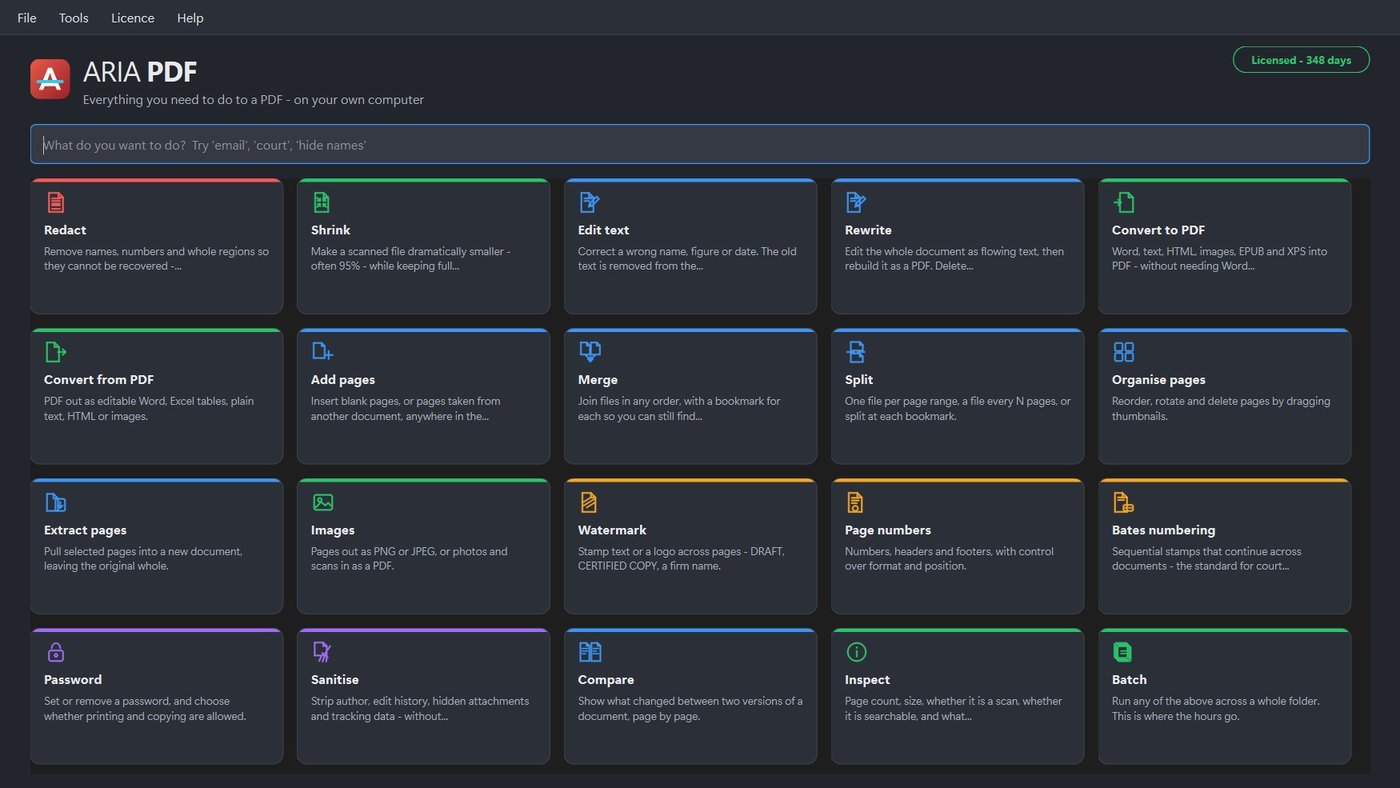
ARIA PDF
The ARIA PDF main window on Windows, showing all twenty
                    tools as colour-coded cards — Redact, Shrink, Edit text,
                    Rewrite, Convert, Merge, Split, Organise, Watermark, Bates
                    numbering, Compare, Inspect and Batch — above a search box
                    reading ‘What do you want to do?’

The actual application. Type what you want to do — “email”, “court”, “hide names” — and it finds the tool.
Why this exists

Every free PDF site asks for the one thing
you cannot give it.

Your file. To merge two pages or black out an account number, the usual route is to hand a confidential document to a server you have never heard of, in a country you did not choose, under terms you did not read. For most people that is a nuisance. If you are bound by privilege, by HIPAA, by a client agreement or by the DPDP Act, it is a breach.

Advocates and law firms

Redact a witness name properly, Bates-number a discovery bundle so every page has a unique reference, and compare two drafts of an agreement page by page — without the file leaving chambers.

Chartered accountants

Batch a folder of scanned invoices down to a fraction of their size for filing, strip metadata before sharing a working paper, and lock a final statement so it can be read but not altered.

Clinics and hospitals

Remove patient identifiers from a record before it goes to a consultant or an insurer — the text deleted from the file, not hidden behind a black rectangle that copies straight back out.

Anyone with a scanner

A 300 DPI scan of a deed is often megabytes a page. ARIA PDF makes it dramatically smaller while keeping it sharp and searchable, so it actually fits an email or a portal upload limit.


The one that matters most

A black rectangle is not redaction.

The most common way to leak a document is to "redact" it by drawing a filled box over the words. The characters are still in the file. Anyone can select the area, copy it, and paste the text you thought you had removed. Scanned pages are worse: they carry an invisible OCR text layer underneath the image, and most tools never touch it.

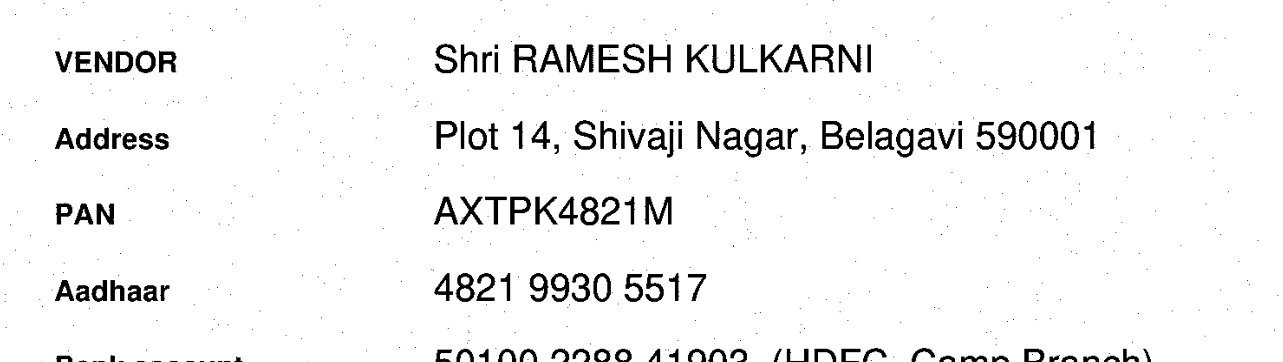
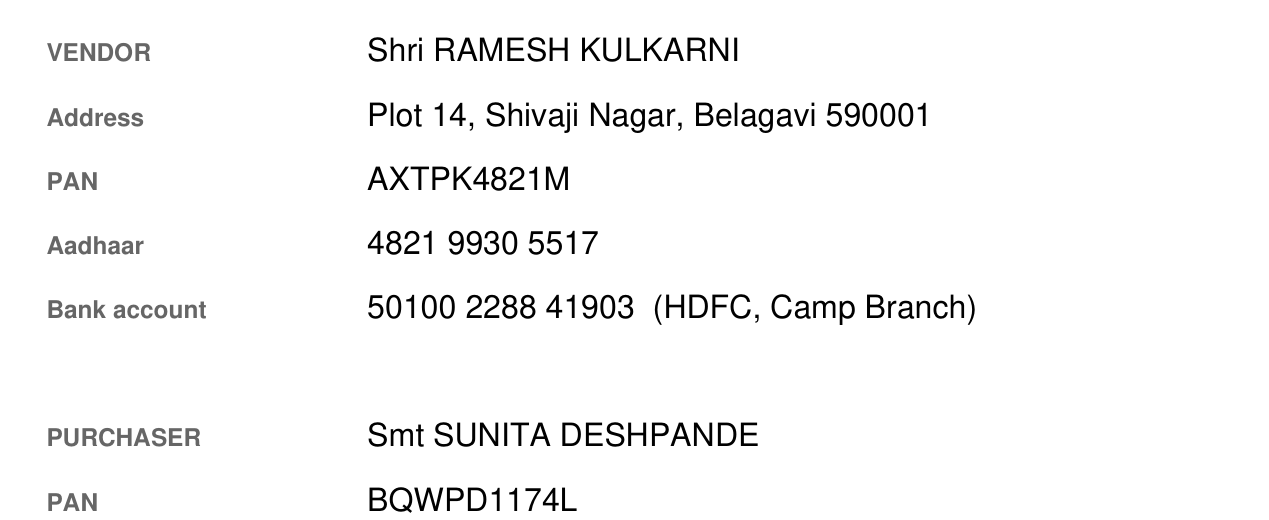
The original 4 fields exposed
sale_deed_1981.pdf  ·  as received
A sale deed showing the vendor's name Shri Ramesh Kulkarni,
                    his address, PAN AXTPK4821M, Aadhaar number and bank account
                    number, all clearly readable. Name PAN Aadhaar Account no.
Everything a fraudster needs, in one page you were about to email.
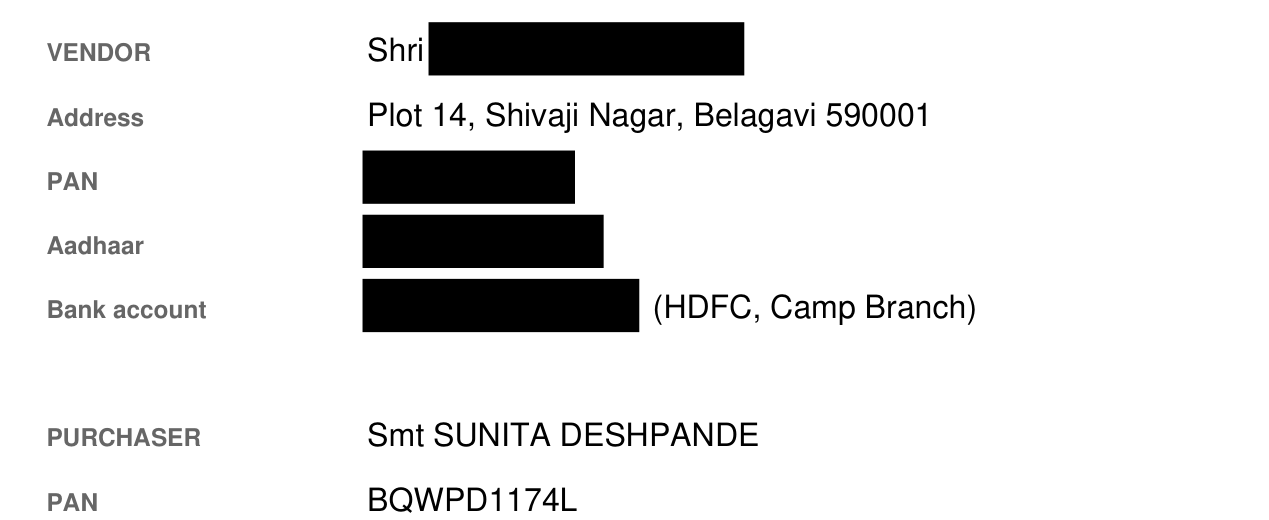
After ARIA PDF Removed from the file
sale_deed_1981_redacted.pdf  ·  safe to send
The same deed after ARIA PDF redaction: the name, PAN,
                    Aadhaar and account number have been deleted from the file
                    and the places they occupied are marked with black bars.
Not covered — deleted. Copy and paste the black bars and you get nothing, because the characters are no longer in the file.

Real output from ARIA PDF, same page, same crop. Every name and number shown is fictional.

How it works

Mark it once. It goes everywhere.

Type a name and every occurrence in the document is marked — not just the one you spotted. Or let it scan for PAN, Aadhaar and account numbers on its own.

  • Draw a box, find text, or auto-detect ID numbers
  • Print a reason in the margin — “REDACTED — S.126 Evidence Act”
  • Redact and verify — it checks the text is really gone
  • Your original file is never modified
A black box drawn over it ✕ still in the file

This Deed of Settlement is made between Anita R. Deshpande, resident of 14 Nehru Road, Belagavi, and the Second Party, in respect of account 3421 8890 0076 held at the said branch.

What copy-paste gives you — press the button —
ARIA PDF — Redact ✓ removed from the file

This Deed of Settlement is made between  , resident of  , and the Second Party, in respect of account   held at the said branch.

What copy-paste gives you — press the button —
Nothing is sent anywhere — this runs in your browser.

Redaction cannot be undone. That is the point — and why it writes a new file and leaves your original exactly as it was.


Measured, not claimed

3.27 MB to 45 KB.
Still 300 DPI. Still searchable.

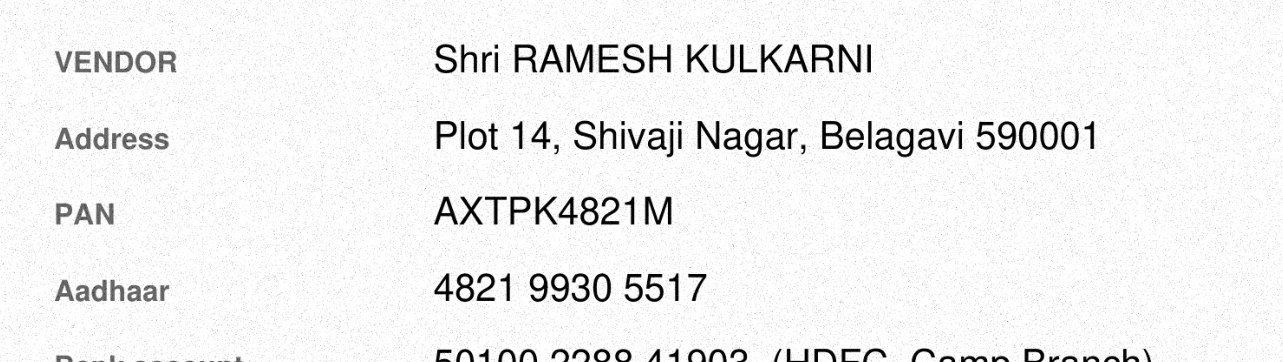
Drag the slider: one real deed, scanned at 300 DPI, before and after. Measured by the compression code itself, not estimated. Yours will differ; the trade-offs will not.

A 300 DPI scan of a deed with visible paper grain and speckle,
                  3.27 MB.
The same scan compressed by ARIA PDF to 45 KB, with the text
                    sharper and the paper noise gone.
3.27 MB scan 45 KB · 98.7% smaller

Drag to compare. The same page at the same zoom — the compressed side is 45 KB, still 300 DPI, still searchable, and the letters are cleaner because the paper grain went with the file size.

You decide, before it runs

It tells you the size first.

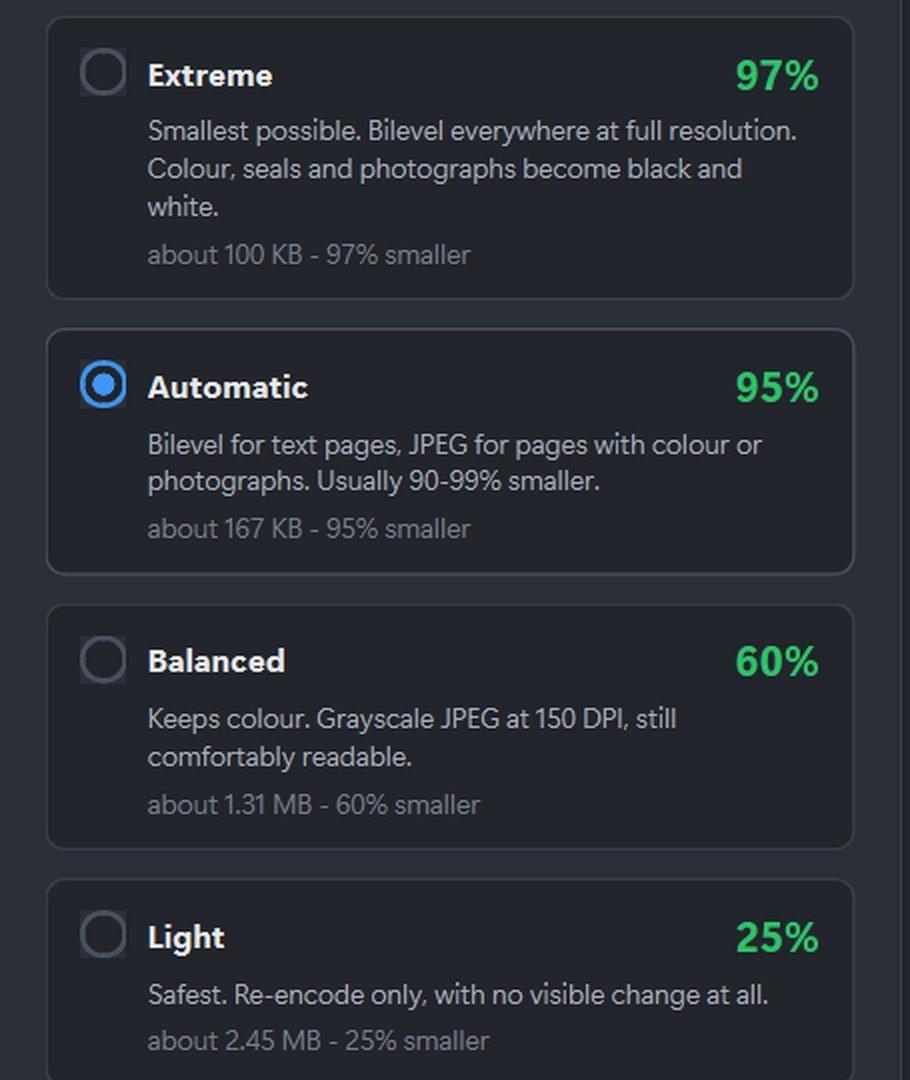
Pick a mode and ARIA PDF estimates the result on your file before you commit — no guessing, no running it three times to find out.

  • Extreme — smallest possible, colour becomes black and white
  • Automatic — bilevel for text pages, JPEG where there's colour
  • Balanced — keeps colour, grayscale at 150 DPI
  • Light — re-encode only, no visible change at all
ARIA PDF — Shrink
The Shrink tool showing four compression modes with estimated
                  results for the loaded file: Extreme about 100 KB and 97%
                  smaller, Automatic about 167 KB and 95% smaller, Balanced
                  about 1.31 MB and 60% smaller, Light about 2.45 MB and 25%
                  smaller.

The honest limit. Bilevel compression discards every shade of grey, so photographs, coloured seals, highlighter and blue-ink signatures lose that information permanently. This is exactly why the default Automatic mode inspects each page first and only uses bilevel where the page is text — everything with colour is compressed as JPEG instead. Extreme, Balanced and Light modes are there when you want to decide yourself.


Everything included

Twenty tools. One licence. No add-ons.

Grouped the way they are grouped in the application, so this page and the product agree with each other.

01 Secure

Redact

Remove names, numbers and whole regions so they cannot be recovered — including the invisible OCR layer under a scan that other tools leave behind.

Cannot be undone. Your original file is never changed.
02 Optimise

Shrink

A 300 DPI scan from 3.27 MB to 45 KB, still full resolution and still searchable. The file that would not fit the portal now fits twenty times over.

95–99% on scanned documents — the app shows you the estimate first.
03 Utility

Batch

Run any tool on this page across an entire folder — four hundred invoices redacted, shrunk or stamped while you do something else.

This is where the hours go.
04 Stamp

Bates numbering

Sequential stamps that continue across a whole set of documents, so every page in a bundle carries a unique reference. The standard for court filings and discovery.


Also included

Sixteen more, at no extra cost.

Kofax gates Bates numbering and advanced redaction behind a ₹20,299 tier. Every tool below is in the ₹2,499 licence — there is no upgrade, because there is nothing above it.

Secure

  • Password — set or remove one, and control printing and copying. AES-256.
  • Sanitise — strip author, edit history, hidden attachments and tracking data.

Edit

  • Edit text — correct a wrong name, figure or date. The old text is removed, not painted over.
  • Rewrite — edit the whole document as flowing text, then rebuild it. Page breaks will move.

Pages

  • Merge — join files in any order, with a bookmark for each.
  • Split — by page range, every N pages, or at each bookmark.
  • Extract — pull pages into a new file, leaving the original whole.
  • Add pages — blank ones, or pages from another document.
  • Organise — reorder, rotate and delete by dragging thumbnails.
  • Compare — show what changed between two versions.

Convert

  • To PDF — Word, text, HTML, images, EPUB and XPS, without needing Word installed.
  • From PDF — out as editable Word, Excel tables, plain text, HTML or images.
  • Images — pages out as PNG/JPEG, or photos and scans in.

Stamp

  • Watermark — text or a logo across pages. DRAFT, CERTIFIED COPY, a firm name.
  • Page numbers — numbers, headers and footers, with control over format and position.

Utility

  • Inspect — page count, size, whether it is a scan, whether it is searchable, what metadata it carries.
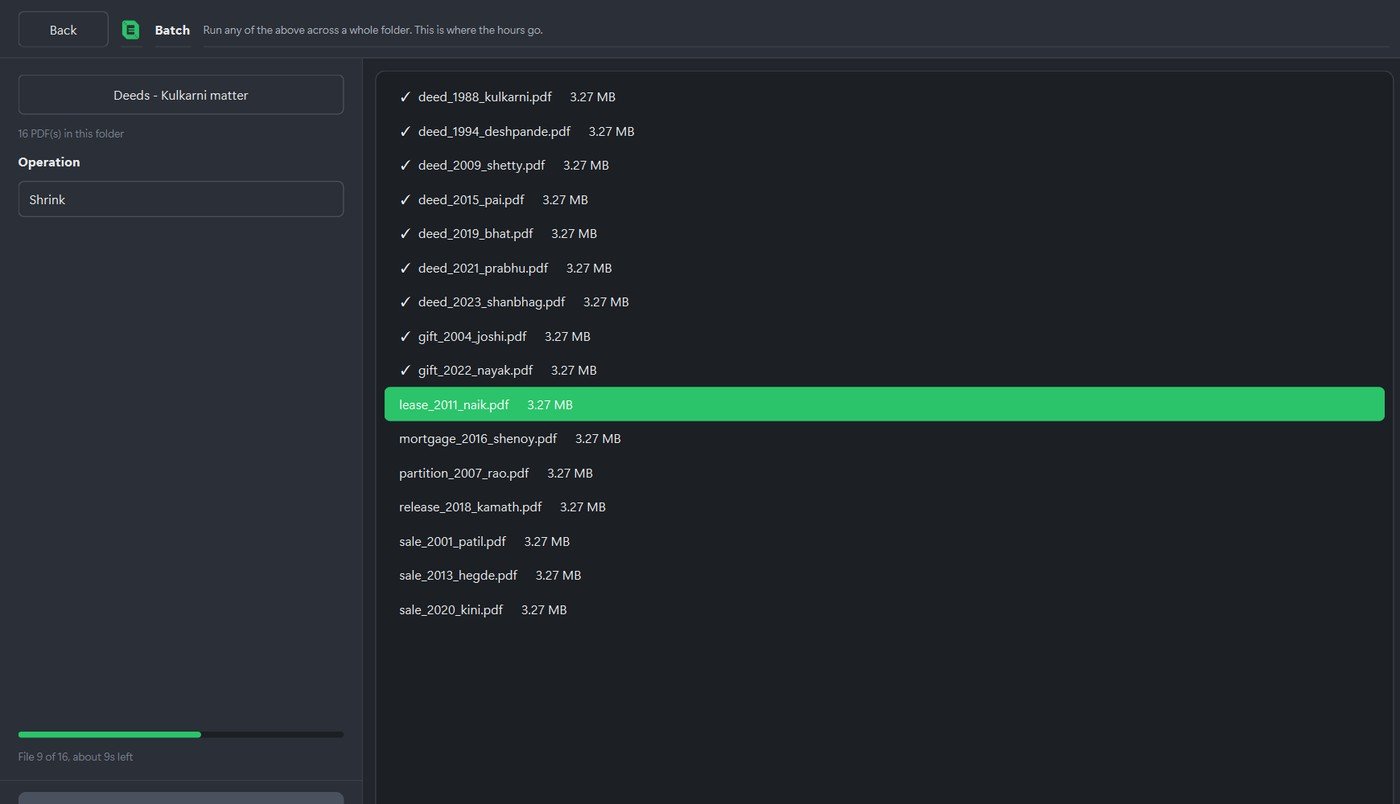
ARIA PDF — Batch
The Batch tool running Shrink over a folder called ‘Deeds —
                  Kulkarni matter’ containing sixteen PDFs. Eight are ticked as
                  done, one is highlighted as it processes, and the progress bar
                  reads ‘File 8 of 16, about 11s left’.
Where the hours go

One folder. Sixteen deeds. Eleven seconds left.

Every tool on this page runs across an entire folder. Point it at a matter, choose the operation, and go and do something else.

  • Any of the twenty tools, applied to every file
  • Progress and time remaining, file by file
  • Cancel at any point — finished files are already saved

The facts

What you are actually buying.

20Tools, all included
892Automated tests
341Against real documents
0Files uploaded
1Internet call, to activate

Windows 10 and 11, 64-bit. One licence covers one computer, and you can move it to another machine yourself from inside the application — useful when a laptop is replaced or reinstalled.


What it costs

₹2,499 a year. Once.

The same jobs — redaction, compression, Bates numbering, merge and convert — priced by the people who normally sell them. Public list prices, checked on their own websites.

What you would otherwise payA year How it is sold
ARIA PDF ₹2,499 One computer. Runs offline. No account.
Adobe Acrobat Pro ~₹26,000 Subscription, with a cancellation fee on the remaining term
Tungsten Power PDF Advanced ₹20,299 Perpetual. Bates numbering and advanced redaction are this tier only.
Tungsten Power PDF Standard ₹14,899 Perpetual, without those two tools

Bates numbering and true redaction are gated to Kofax/Tungsten's ₹20,299 tier. ARIA PDF includes both at ₹2,499 — about a tenth of Acrobat's yearly cost, and there is no upsell above it, because there is nothing above it.


Questions

The things people ask first.

Is my PDF uploaded anywhere?

No. Every tool runs on your own computer. There is no upload, no cloud queue and no account. The only time ARIA PDF contacts the internet is once, to activate your licence.

Does redaction actually remove the text?

Yes. The characters are deleted from the file, and the invisible OCR text layer under a scan goes with them. Drawing a black rectangle — which many tools call redaction — leaves the words underneath, where anyone can copy them straight back out.

How much smaller can it make a scanned PDF?

Two real examples, both at full 300 DPI and both still searchable: the deed scan in the slider above went from 3.27 MB to 45 KB, and a second measured document went from 1.78 MB to 0.018 MB. Pages with colour are handled differently so seals and signatures survive. Your files will differ; the table above shows the real trade-offs.

Do I need Microsoft Word installed?

No. Word, text, HTML, images, EPUB and XPS convert to PDF without Word or any other application installed.

Is there a free trial?

Yes — seven days and 25 pages, with every tool available. No card and no account are needed to start it.

Can I move the licence to another computer?

Yes, from inside the application. One licence covers one computer at a time, and you can release it yourself before replacing or reinstalling a machine.

What is Bates numbering for?

Sequential stamps that continue across a whole set of documents, so every page in a bundle carries a unique reference. It is the standard for court filings and discovery.

Is it a subscription?

No. You buy a fixed term — one, two or three years — as a single payment. Nothing auto-renews and no card is stored. When the term ends you decide whether to renew.


On sale now

Twenty tools. ₹2,499 a year.
Nothing leaves your computer.

892 automated tests, 359 of them against real documents. Try it free for seven days and 25 pages before you decide — no account, no card, and the trial runs on your own machine like everything else here.